
STP配置实验
一、实验目的:
- 理解交换机中STP协议的作用。
- 掌握配置、查看STP信息的方法。
- 掌握修改桥优先级,控制根桥选举的方法
- 掌握修改端口优先级,控制根端口和指定端口选举的方法。
- 掌握修改端口开销,控制根端口和指定端口选举的方法。
二、实验环境
- 配置网卡的计算机。
- 交换机。
三、实验内容
- 配置STP协议。
- 配置桥优先级,控制根桥选举。
- 配置端口优先级,控制根端口和指定端口选举。
- 配置端口开销,控制根端口和指定端口选举。
四、相关知识
STP简介
- 在企业网络中,为了提高网络可靠性,交换网络中通常会使用冗余链路。交换机之间通过多条链路互连时,虽然能够提升网络可靠性,但同时也会带来环路问题。环路会引起广播风暴、网络中的主机会收到重复数据帧、环路会引起MAC地址表震荡。
- STP通过阻塞端口来消除环路,并能够实现链路备份的目的。
- STP协议通过交换机之间交换BPDU,完成以下工作。
- 选举一个根桥。
- 每个非根交换机选举一个根端口。 Root Port
- 每个网段选举一个指定端口。 Designated Port
- 阻塞非根、非指定端口。 Alternate Port
- 从而消除环路。
五、实验范例
1、实验场景
- 作为公司的网络管理员,为了避免网络中的环路问题,需要在网络中的交换机上配置STP。本实验中,还需要通过修改桥优先级来控制STP的根桥选举。
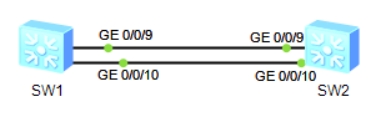
2、实验网络拓扑图
- 实验拓扑中,两台交换机相连,构成了网络环路
3、实验步骤
(1)配置STP并验证
- 本实验中,SW1和SW2之间有两条链路。在SW1和SW2上启用STP,并把SW1配置为根桥。
- SW1配置步骤如下:
<Huawei>
<Huawei>sys
[Huawei]sys SW1
[SW1]undo info en
配置STP模式为标准STP,华为设备默认启动MSTP
[SW1]stp mode stp
配置SW1为根交换机primary(优先级为0)
[SW1]stp root pri
- SW2配置步骤如下:
<Huawei>sys
[Huawei]sys SW2
[SW2]undo info en
[SW2]stp mode stp
配置SW1为备份根交换机secondary(优先级为4096)
[SW2]stp root sec
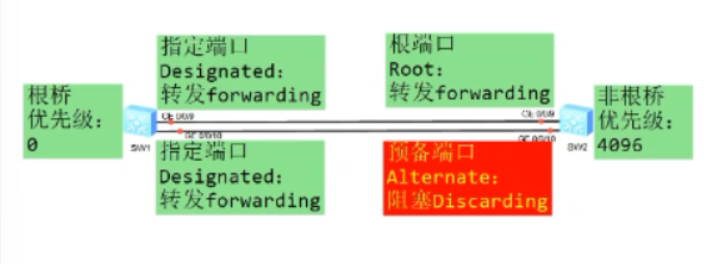
- SW1执行display stp brief命令查看STP信息。
在SW1执行display stp brief命令查看STP基本信息。
[SW1]dis stp b
 MSTID  Port                        Role  STP State     Protection
   0    GigabitEthernet0/0/9        DESI  FORWARDING      NONE
   0    GigabitEthernet0/0/10       DESI  FORWARDING      NONE
角色Role:DESI=Designated指定端口,ROOT=Root根端口,ALTE=Alternate预备端口
状态STP State:FORWARDING转发、DISCARDING阻塞、LEARNING学习
- SW2执行display stp brief命令查看STP信息。
[SW2]dis stp b
 MSTID  Port                        Role  STP State     Protection
   0    GigabitEthernet0/0/9        ROOT  FORWARDING      NONE
   0    GigabitEthernet0/0/10       ALTE  DISCARDING      NONE
- SW1执行display stp interface命令查看端口的STP状态。
SW1执行display stp interface命令查看端口的STP状态。
[SW1]dis stp int g0/0/10
-------[CIST Global Info][Mode STP]-------
* CIST Bridge         :0    .4c1f-ccc1-4646       桥ID:优先级+MAC地址
Config Times        :Hello 2s MaxAge 20s FwDly 15s MaxHop 20
Active Times        :Hello 2s MaxAge 20s FwDly 15s MaxHop 20
* CIST Root/ERPC      :0    .4c1f-ccc1-4646 / 0 **根桥ID:优先级+MAC地址**
* CIST RegRoot/IRPC   :0    .4c1f-ccc1-4646 / 0   **桥ID:优先级+MAC地址**
CIST RootPortId     :0.0
BPDU-Protection     :Disabled
CIST Root Type      :Primary root
TC or TCN received  :21
TC count per hello  :0
STP Converge Mode   :Normal
Time since last TC  :0 days 0h:0m:14s
Number of TC        :6
Last TC occurred    :GigabitEthernet0/0/9
----[Port10(GigabitEthernet0/0/10)][FORWARDING]----转发状态
 Port Protocol       :Enabled
 Port Role           :Designated Port 指定端口
 Port Priority       :128 端口优先级
 Port Cost(Dot1T )   :Config=auto / **Active=20000 端口开销**
 Designated Bridge/Port   :0.4c1f-ccc1-4646 / 128.10
 Port Edged          :Config=default / Active=disabled
 Point-to-point      :Config=auto / Active=true
 Transit Limit       :147 packets/hello-time
 Protection Type     :None
 Port STP Mode       :STP 模式为STP
 Port Protocol Type  :Config=auto / Active=dot1s
 BPDU Encapsulation  :Config=stp / Active=stp
 PortTimes           :Hello 2s MaxAge 20s FwDly 15s RemHop 20
 TC or TCN send      :17
 TC or TCN received  :4
 BPDU Sent           :56
          TCN: 0, Config: 56, RST: 0, MST: 0
 BPDU Received       :7
          TCN: 0, Config: 7, RST: 0, MST: 0
- [SW2]display stp interface GigabitEthernet 0/0/10
[SW2]dis stp int g0/0/10
-------[CIST Global Info][Mode STP]-------
* CIST Bridge         :4096 .4c1f-ccb4-3eec           桥ID:优先级+MAC地址
Config Times        :Hello 2s MaxAge 20s FwDly 15s MaxHop 20
Active Times        :Hello 2s MaxAge 20s FwDly 15s MaxHop 20
* CIST Root/ERPC      :0    .4c1f-ccc1-4646 / 20000 **根桥ID:优先级+MAC地址**
* CIST RegRoot/IRPC   :4096 .4c1f-ccb4-3eec / 0       **桥ID:优先级+MAC地址**
CIST RootPortId     :128.9
BPDU-Protection     :Disabled
CIST Root Type      :Secondary root
TC or TCN received  :38
TC count per hello  :0
STP Converge Mode   :Normal
Time since last TC  :0 days 0h:3m:15s
Number of TC        :6
Last TC occurred    :GigabitEthernet0/0/9
----[Port10(GigabitEthernet0/0/10)][DISCARDING]----阻塞状态
 Port Protocol       :Enabled
 Port Role           :Alternate Port 预备端口
 Port Priority       :128 端口优先级
 Port Cost(Dot1T )   :Config=auto / **Active=20000 端口开销**
 Designated Bridge/Port   :0.4c1f-ccc1-4646 / 128.10
 Port Edged          :Config=default / Active=disabled
 Point-to-point      :Config=auto / Active=true
 Transit Limit       :147 packets/hello-time
 Protection Type     :None
 Port STP Mode       :STP
 Port Protocol Type  :Config=auto / Active=dot1s
 BPDU Encapsulation  :Config=stp / Active=stp
 PortTimes           :Hello 2s MaxAge 20s FwDly 15s RemHop 0
 TC or TCN send      :0
 TC or TCN received  :17
 BPDU Sent           :2
          TCN: 0, Config: 2, RST: 0, MST: 0
 BPDU Received       :108
          TCN: 0, Config: 108, RST: 0, MST: 0
- 在SW1和SW2中,哪个是根桥?SW1的两个端口的角色是什么?SW2的两个端口角色是什么?哪个端口阻塞?
- sw1是根桥
(2)控制根桥选举
- SW1、SW2分别执行display stp命令查看根桥信息。
- 根桥设备SW1的CIST Bridge与CIST Root/ERPC字段取值相同。
SW1执行display stp命令查看STP状态。
[SW1]dis stp
-------[CIST Global Info][Mode STP]-------
* **CIST Bridge         :0    .4c1f-ccc1-4646**
Config Times        :Hello 2s MaxAge 20s FwDly 15s MaxHop 20
Active Times        :Hello 2s MaxAge 20s FwDly 15s MaxHop 20
* **CIST Root/ERPC      :0    .4c1f-ccc1-4646 / 0**
CIST RegRoot/IRPC   :0    .4c1f-ccc1-4646 / 0
CIST RootPortId     :0.0
BPDU-Protection     :Disabled
CIST Root Type      :Primary root
TC or TCN received  :21
TC count per hello  :0
STP Converge Mode   :Normal
Time since last TC  :0 days 0h:7m:33s
Number of TC        :6
Last TC occurred    :GigabitEthernet0/0/9

[SW2]dis stp
-------[CIST Global Info][Mode STP]-------
* **CIST Bridge         :4096 .4c1f-ccb4-3eec**
Config Times        :Hello 2s MaxAge 20s FwDly 15s MaxHop 20
Active Times        :Hello 2s MaxAge 20s FwDly 15s MaxHop 20
* **CIST Root/ERPC      :0    .4c1f-ccc1-4646 / 20000**
CIST RegRoot/IRPC   :4096 .4c1f-ccb4-3eec / 0
CIST RootPortId     :128.9
BPDU-Protection     :Disabled
CIST Root Type      :Secondary root
TC or TCN received  :38
TC count per hello  :0
STP Converge Mode   :Normal
Time since last TC  :0 days 0h:7m:50s
Number of TC        :6
Last TC occurred    :GigabitEthernet0/0/9
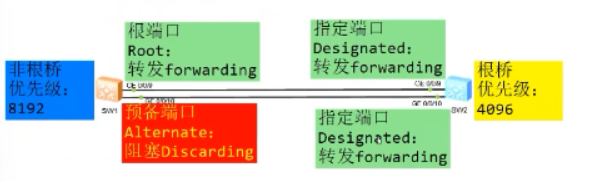
- 通过配置优先级,使SW2为根桥,SW1为备份根桥。桥优先级取值越小,则优先级越高。
- 把SW1和SW2的优先级分别设置为8192和4096。
通过配置优先级,使SW2为根桥,SW1为备份根桥。
桥优先级取值越小,则优先级越高。
把SW1和SW2的优先级分别设置为8192和4096。
[SW1]undo stp root
[SW1]stp pri 8192

[SW2]undo stp root
[SW2]stp pri 4096
- 再次在SW1、SW2上执行display stp命令查看新的根桥信息。
[SW1]dis stp
-------[CIST Global Info][Mode STP]-------
CIST Bridge         :8192 .4c1f-ccc1-4646           桥ID:优先级+MAC地址
Config Times        :Hello 2s MaxAge 20s FwDly 15s MaxHop 20
Active Times        :Hello 2s MaxAge 20s FwDly 15s MaxHop 20
CIST Root/ERPC      :4096 .4c1f-ccb4-3eec / 20000 根桥ID:优先级+MAC地址
CIST RegRoot/IRPC   :8192 .4c1f-ccc1-4646 / 0       桥ID:优先级+MAC地址
CIST RootPortId     :128.9
BPDU-Protection     :Disabled
TC or TCN received  :21
TC count per hello  :0
STP Converge Mode   :Normal
Time since last TC  :0 days 0h:2m:12s
Number of TC        :7
Last TC occurred    :GigabitEthernet0/0/10


[SW2]dis stp
-------[CIST Global Info][Mode STP]-------
CIST Bridge         :4096 .4c1f-ccb4-3eec       桥ID:优先级+MAC地址
Config Times        :Hello 2s MaxAge 20s FwDly 15s MaxHop 20
Active Times        :Hello 2s MaxAge 20s FwDly 15s MaxHop 20
CIST Root/ERPC      :4096 .4c1f-ccb4-3eec / 0 根桥ID:优先级+MAC地址
CIST RegRoot/IRPC   :4096 .4c1f-ccb4-3eec / 0   桥ID:优先级+MAC地址
CIST RootPortId     :0.0
BPDU-Protection     :Disabled
TC or TCN received  :72
TC count per hello  :0
STP Converge Mode   :Normal
Time since last TC  :0 days 0h:0m:32s
Number of TC        :8
Last TC occurred    :GigabitEthernet0/0/10
- 再次在SW1、SW2执行display stp brief命令查看STP信息。
[SW1]dis stp b
 MSTID  Port                        Role  STP State     Protection
   0    GigabitEthernet0/0/9        ROOT  FORWARDING      NONE
   0    GigabitEthernet0/0/10       ALTE  DISCARDING      NONE

[SW2]dis stp b
 MSTID  Port                        Role  STP State     Protection
   0    GigabitEthernet0/0/9        DESI  FORWARDING      NONE
   0    GigabitEthernet0/0/10       DESI  FORWARDING      NONE
由上述回显信息可以看出,在SW1和SW2中,哪个是根桥?为什么会成为根桥?SW1的两个端口的角色是什么?SW2的两个端口角色是什么?哪个端口阻塞?
(3)控制根端口选举
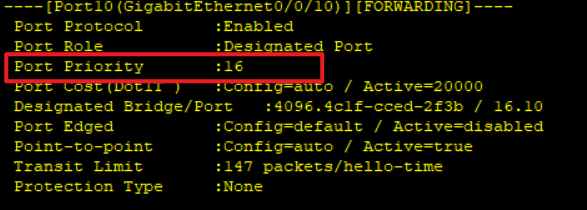
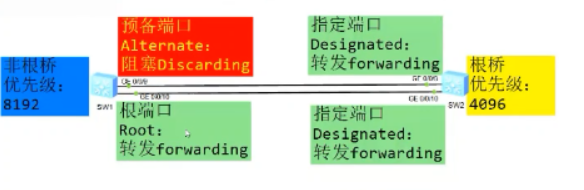
- 修改端口优先级,使SW1的G0/0/10成为根端口,G0/0/9成为Alternate端口。
- 修改SW2上G0/0/9和G0/0/10端口的优先级。
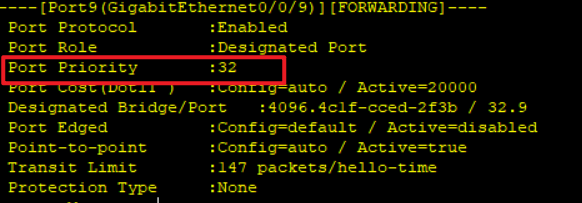
缺省情况下端口优先级为128。端口优先级取值越大,则优先级越低。
在SW2上,修改G0/0/9的端口优先级值为32,G0/0/10的端口优先级值为16。
因此,SW1上的G0/0/10端口优先级高于S2的G0/0/10端口优先级,成为根端口。
提示:此处是修改SW2的端口优先级,而不是修改SW1的端口优先级。
[SW2]int g0/0/9
[SW2-GigabitEthernet0/0/9]stp port pri 32
[SW2-GigabitEthernet0/0/9]q
[SW2]int g0/0/10
[SW2-GigabitEthernet0/0/10]stp port pri 16
[SW2-GigabitEthernet0/0/10]q
- 在SW2上执行display stp interface命令查看端口信息。
display stp interface g0/0/9
display stp interface g0/0/10
- 在SW1上执行display stp brief命令查看端口角色。
[SW1]dis stp b
 MSTID  Port                        Role  STP State     Protection
   0    GigabitEthernet0/0/9        ALTE  DISCARDING      NONE
   0    GigabitEthernet0/0/10       ROOT  FORWARDING      NONE
- SW1的两个端口的角色是什么?为什么会这样?
(4)配置端口开销,控制根端口选举
- 修改SW1的G0/0/10端口开销为200000。
[SW1]int g0/0/10
[SW1-GigabitEthernet0/0/10]stp cost 200000
[SW1-GigabitEthernet0/0/10]q
- 在SW1上执行display stp brief命令查看端口角色。
[SW1]dis stp b
 MSTID  Port                        Role  STP State     Protection
   0    GigabitEthernet0/0/9        ROOT  FORWARDING      NONE
   0    GigabitEthernet0/0/10       ALTE  DISCARDING      NONE